
Networked Virtual Reality and Kvasir-VR
- Teacher Awareness of Student Actions and Attention in a VR Classroom
- Cross-Reality Desktop Interfaces for Presenting to an Immersed Audience (2021 – 2025)
- A Study of Class Meetings in VR (2020-2021)
- Kvasir-VR: Networked VR Overview
- Teacher-guided Networked VR Field Trips
- Tiny House Walkthrough and Other Collaboration with High Schools
- Remotely-guided VR for Geosciences Interpretation
- Networked Virtual Tennis with Heterogeneous Displays
- Networked Touch with 2D Tactile Grids
- Teleoperation and Security of Surgical Robots (2023+)
- Networked robotics : Telepresence and Predictive Displays
Teacher Awareness of Student Actions and Attention in a VR Classroom (2020)
Researchers: David M Broussard, Yitoshee Rahman
Networked social VR can host remote classes, but it gives a teacher far fewer cues about the class than an in-person room: subtle face and body motion is missing, the field of view is narrow, and students can place their avatars anywhere, even behind the teacher or hovering in the air. We designed an interface that keeps an overview of the students within the teacher’s field of attention. Indicators summarize each student’s attention, gaze, and state, such as distressed, confused, or tired; face icons and tethers show where students are; and avatars show raised hands, typed messages, or lost tracking.
In a pilot study, 11 participants acted as a teacher in a VR classroom of 20 simulated students and chose among cue styles and settings. Ten of the 11 preferred all student indicators grouped in one place over indicators floating near each student, and most preferred face icons with moving eyes. Participants asked to keep the displayed information to a minimum, so that a teacher can focus on the students who most need attention.
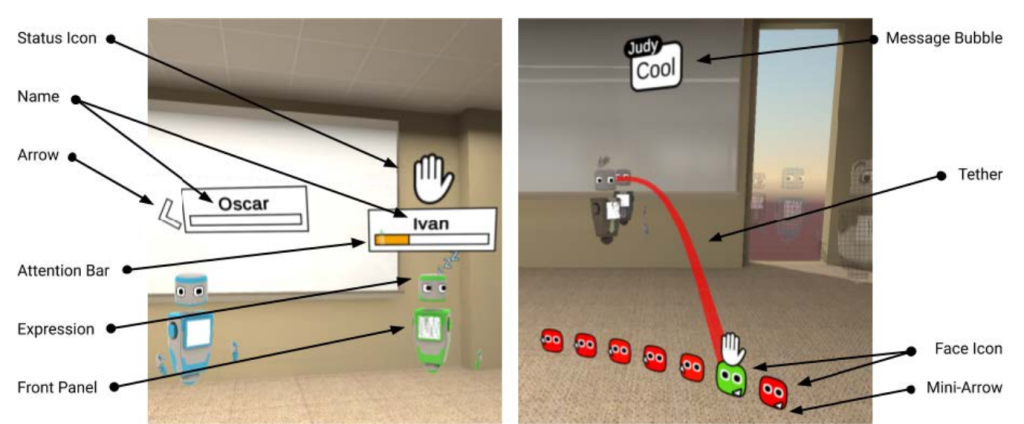
Visual glossary of indicator elements, for both floating (left) and classwide (right) display styles
Publications:
Application: Tools for Teaching Classes in Social VR
Cross-Reality Desktop Interfaces for Presenting to an Immersed Audience (2021 – 2025)
Researchers: Jason Woodworth and David Broussard
VR can connect presenters and audience in immersive environments with expressive avatars that can convey the speaker’s intent. However, we have seen a reluctance for presenters (e.g. teachers or conference speakers) to adopt VR, due in part to a personal lack of comfort with headsets and VR’s lack of innate tools for common tasks like running through slides or looking at notes. VR meeting spaces typically include desktop interfaces for this very reason, but most simply aim to simulate the first-person VR experience rather than designing for the actual task of presenting or producing a lively, expressive avatar.
To address this, we designed several Cross-Reality desktop interfaces that are easier to use than the conventional desktop interface and can use additional sensors to better animate the presenter’s avatar. For example, the user’s gaze is presented by having the avatar look at an in-world position associated with the screen position the user looks at. Our experiments evaluated these interfaces from the perspective of the presenter as a user and the audience as a viewer of the resulting avatar. Results showed that viewers found the avatar similarly human-like when compared to a VR-driven avatar, and that presenters found the interface intuitive and more usable than the conventional desktop approach.
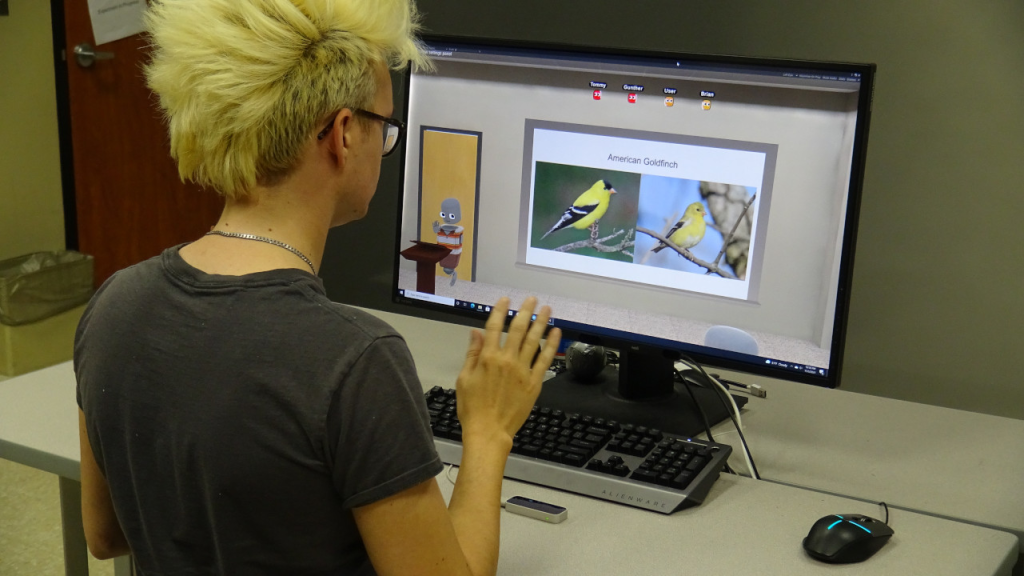
A user sitting at the presenter interface waving to the audience. A Leap Motion Controller is positioned on the desk directly in front of them to capture hand movement. A Tobii Eye Tracker is attached to the bottom of the monitor to capture eye and head movements.
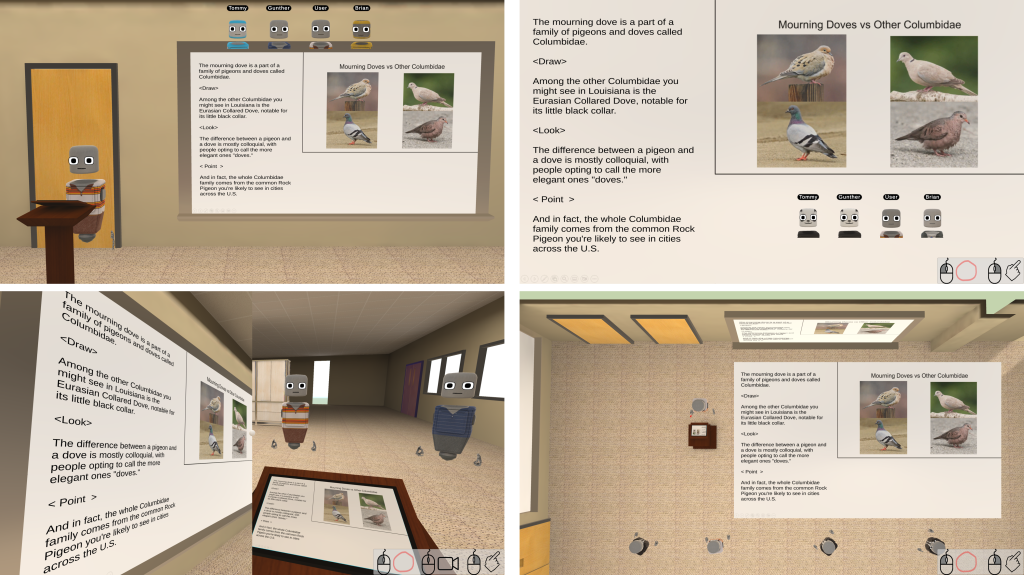
The four desktop interfaces studied in our experiment from the presenter’s perspective. Top left: SDesk, a novel interface showing the presenter and board from an audience perspective and incorporating desktop-based eye tracking to control the presenter’s avatar’s gaze. Top right: PPT, an adaptation of PowerPoint’s “Presenter View” made compatible with a cross-reality interface. Bottom left: Conventional Desktop, a recreation of common first-person controllers used for cross-reality meeting spaces. Bottom right: TopDown, a bird’s-eye view of the environment allowing the presenter to see all audience members in context of the virtual world.
Videos:
Related Publications:
J. W. Woodworth, D. Broussard and C. W. Borst, “Redirecting Desktop Interface Input to Animate Cross-Reality Avatars,” 2022 IEEE Conference on Virtual Reality and 3D User Interfaces (VR), Christchurch, New Zealand, 2022, pp. 843-851, doi: 10.1109/VR51125.2022.00106. (PDF)
J. W. Woodworth and C. W. Borst, “Study of Cross-Reality Interfaces with Avatar Redirection to Improve Desktop Presentations to Headset-Immersed Audiences,” 2024 IEEE Conference on Virtual Reality and 3D User Interfaces Abstracts and Workshops (VRW), Orlando, FL, USA, 2024, pp. 1082-1083, doi: 10.1109/VRW62533.2024.00337. (PDF)
Application: Tools for Teaching Classes in Social VR
A Study of Class Meetings in VR (2020-2021)
Researchers: Andrew Yoshimura
We studied student experiences of social VR for remote instruction, with students attending a university course from home over seven weeks in Mozilla Hubs. We compared viewing remote lectures with VR headsets, viewing with desktop displays, and presenting with VR headsets, and asked students to reflect on several weeks of VR-based class attendance. Students rated presence, social presence, simulator sickness, communication methods, avatar and application features, and tradeoffs with other remote approaches.
Headset-based viewing and presenting produced higher presence than desktop viewing, but had a less clear impact on overall experience and on most social presence measures. Presenting with a headset produced higher attentional allocation than either viewing method. For headset users, simulator sickness (mostly general discomfort) was strongly negatively correlated with co-presence and overall experience: comfortable users benefited from headsets, but others did not. Desktop VR appears to be a good alternative for uncomfortable students, and students preferred a mix of headset and desktop viewing.

A lecture in Mozilla Hubs, seen by an audience member at the back of the room.

A student presents a project update in Mozilla Hubs; the presenter is at the left.
Video:
Related Publication:
Andrew Yoshimura and Christoph W. Borst, “A Study of Class Meetings in VR: Student Experiences of Attending Lectures and of Giving a Project Presentation,” Frontiers in Virtual Reality, Volume 2 (2021), doi: 10.3389/frvir.2021.648619. (PDF)
Application: Class Meetings in Social VR
Kvasir-VR: Networked VR Overview

“Kvasir-VR” refers to our networked collaborative VR approaches, and especially to those that let teachers guide students who are immersed in VR environments. Kvasir-VR enables immersed students to meet remote experts for guided activities, or to be guided and assisted more directly by their nearby teacher. Our most recent work captures a teacher using a 3D camera (Kinect) and streams the data over a network for incorporation into live VR field trips. Classroom-deployable VR stations and our specialized teacher interface allow us to bring the approaches “into the field” to study them in real classrooms. The following outline overviews Kvasir-VR:
- Networked VR Field Trip technology
- Live or prerecorded 3D teacher imagery streamed into VR, guiding immersed users
- Classroom-deployable VR stations
- Specialized practical interfaces for teacher and students
- Explored Applications
- Geosciences interpretation: Geologists remotely guiding an audience
- Solar energy education: VR field trips of a solar plant, deployed at high schools
- Tiny house walkthrough: streamed between two local schools
- VR tennis: preliminary work on networked asynchronous displays
- Many more education and workforce training applications possible
- Long-distance networked operation
- Lafayette to Austin TX at Smart Cities events, 2016 and 2017
- Lafayette to Adelaide, Australia, at launch of IgniteSA, Oct 2017 using LONI, Internet2, Pacific Wave, AARNET
- Lafayette to Chattanooga Downtown Library, June-July, 2018
- Links and Awards
- Best Research Demo award at IEEE VR 2017
- 2016 US Ignite award for creative use of gigabit networks
- Post-Secondary Educator of the Year (2016) award related to VR education
- Press release: International demo between Lafayette and Australia
- Kvasir-VR summary description at US Ignite
- Kvasir-VR summary description at Mozilla Pulse
- Funding: NSF, Louisiana BoRSF, US Ignite, Mozilla
Teacher-guided Networked VR Field Trips (2014+)
We applied Kvasir-VR field trip approaches in the Networked Virtual Energy Center application to allow a live remote teacher to guide students through a virtual solar plant. A standalone version with recorded 3D teacher clips can also provide the field trips, independently. Our most recent experiment studied the effects of the live (networked) vs. pre-recorded (standalone) approaches. The system has been deployed to hundreds of students in high school classrooms, and to thousands through outreach events. Major demonstrations of the the live version included interstate and intercontinental operation using high-performance research networks such as Internet2.
Images
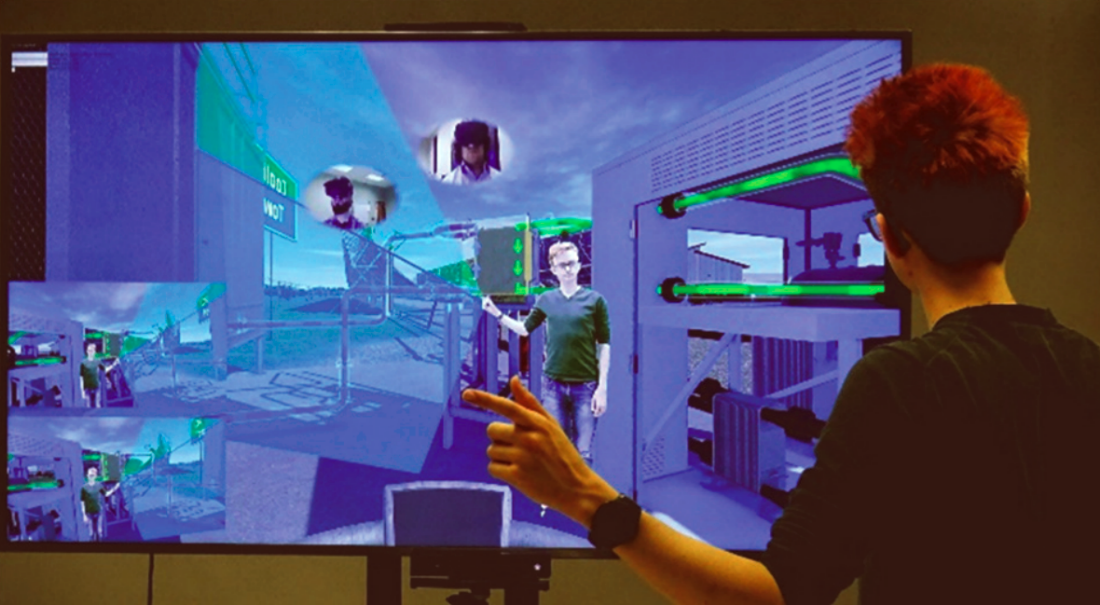
A remote teacher guides students from a large TV interface with a Kinect mounted at its bottom. Visuals include: 1) a mirror view of the environment, 2) synchronized student views at the TV’s lower left, 3) webcam views of students, in ovals hovering at positions for teacher to make eye contact with the students, and 4) pointing cues to help the teacher point correctly in 3D.
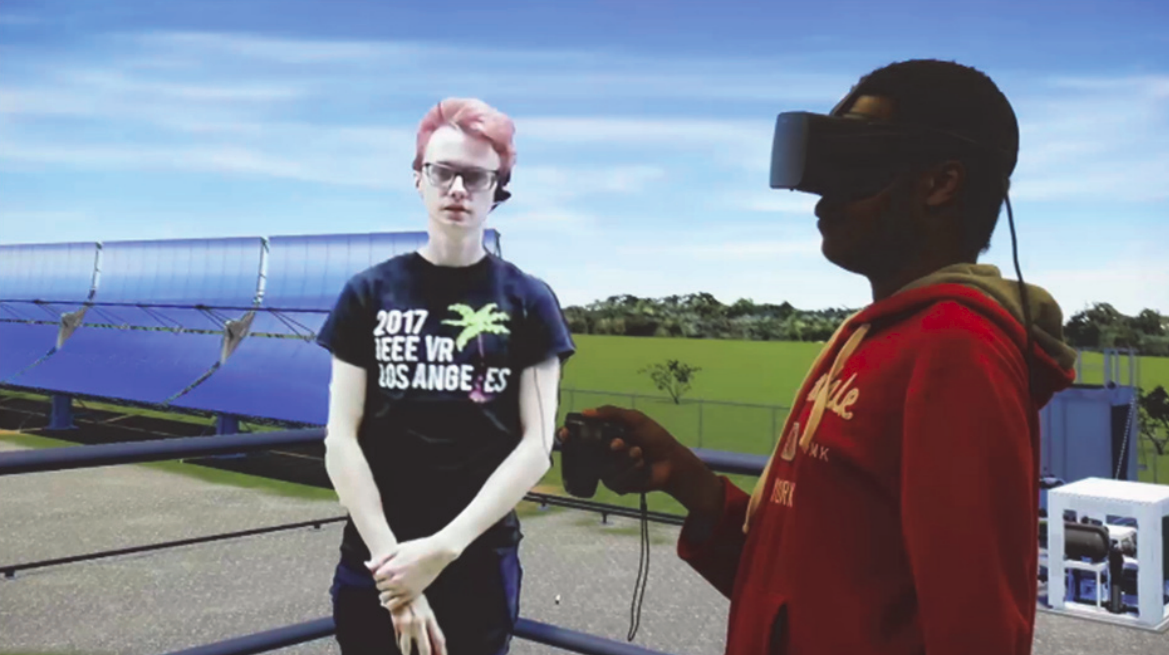
A student wearing a head-mounted display stands at a virtual tower overviewing a virtual solar plant (the background duplicates the student’s view for illustration). A teacher (seen to the left) provides an introduction to the plant and is represented by a mesh captured by a Kinect depth camera.
Video accompanying a paper submission to the IEEE VR 2018 conference : “Teacher-Guided Educational VR: Assessment of Live and Prerecorded Teachers Guiding Field Trips”. The paper describes the “Kvasir-VR” framework for embedding teachers into VR and assesses live (networked) and prerecorded teachers in high schools. The teacher imagery is from a depth camera (Kinect), so it looks rougher than green screen techniques, but it is 3D and does not require a special background.
Selected Publications
- IEEE VR 2018 paper overviewing Kvasir-VR and evaluating networked and standalone approaches. (PDF) (Video)
- IEEE Workshop paper (Everyday Virtual Reality 2017) discussing a TV-based teacher interface and evaluating visual pointing cues. (PDF) (DOI)
- IEEE VR 2017 demo abstract about the teacher-student collaboration interface. Winner of the “Best Research Demo” award. (PDF) (Video) (DOI)
- ISVC (Visual Computing) paper describing techniques for mesh streaming, rendering, and the teacher’s interface. (PDF) (DOI)
Tiny House Walkthrough and Other Collaboration with High Schools (2017-2018)
With funding from the Mozilla Foundation, we brought our approaches to educational VR applications envisioned by high school faculty and students. We set up Kvasir-VR between two schools, allowing a student at one school to remotely guide a VR walkthrough of a tiny house to explain its purpose and features. The high school students are involved in constructing the real tiny house. Our mentoring of students and other project activities are further documented in our Mozilla Gigabit Community Fund Blog.
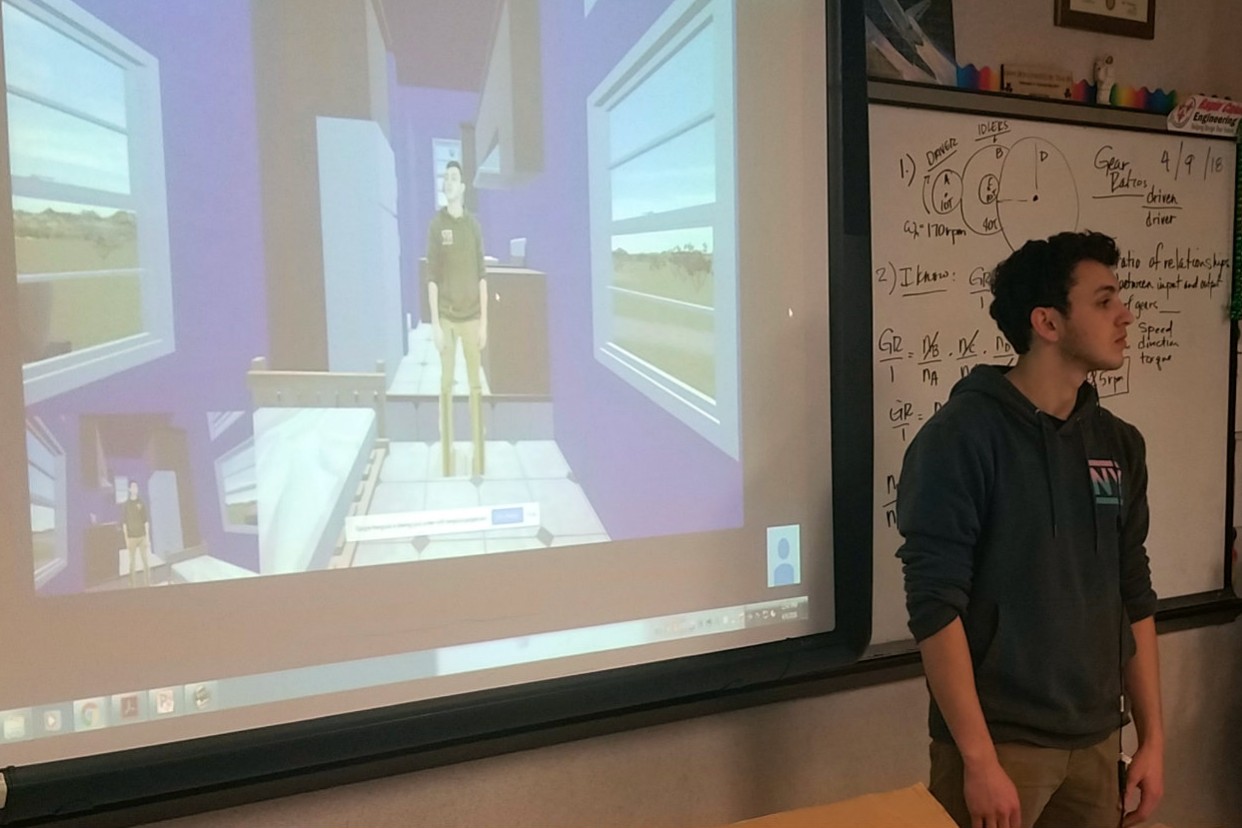
Local high school student Andre Garcia remotely guides a Carencro High student through his virtual Tiny House model.

A depth-camera avatar of the guide inside the untextured tiny house, during development.
Our project and department were featured in the following wrap-up documentary from Mozilla and AOC Community Media.
Application: Tiny House Walkthrough Between High Schools
Remotely-guided VR for Geosciences Interpretation (2005+)
Research Assistants: Kaushik Das, Jan-Phillip Tiesel, Vijay Baiyya, Chris Best, Adam Guichard
Overview
This application of networked VR and asynchronous displays allowed a geologist to use a low-cost desktop VR display to remotely guide users immersed by head-mounted displays or large projection displays. The geologist guided viewers through live interpretations of various datasets associated with the Chicxulub impact crater area, which is believed to be related to sudden mass extinctions. A proposed expansion of this project to national research networks received support from US Ignite in 2014 and then became the Networked Virtual Energy Center project above.
Remotely-guided VR with the multiple networked display types was demonstrated at a special session at the GCAGS 2006 conference (link), using local networking. Our first deployment that connected separated (remote) sites was at a 2006 conference of the Independent Association of Drilling Contractors, during which our VR lab was connected to a large-scale visualization facility (LITE).
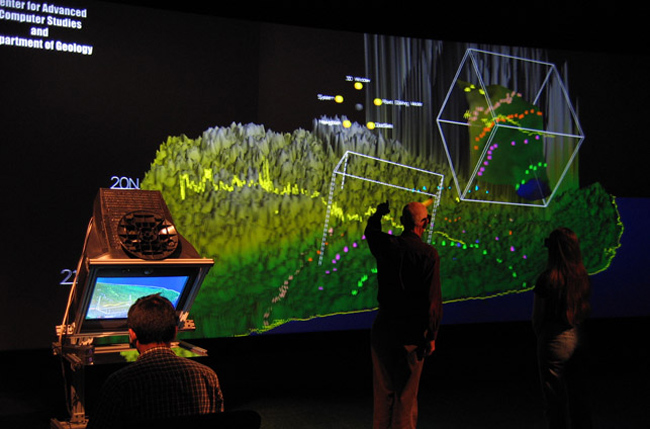
Geological study of an impact crater with networked asynchronous displays for remotely-guided VR interpretation. Users annotate data surfaces and check several datasets for correspondence. The picture was taken during CGACS 2006 setup and later appeared in the Handbook of Virtual Environments (2nd Edition, 2014).
Also see our videos: Composable Volumetric Lenses and 3D Windows in Geosciences Exploration System.
Collaborative Interpretation in Geo-sciences Datasets (2018)
A followup on a previous geosciences data visualization tool, this application immerses multiple users in the Chicxulub impact crater for exploration and interpretation using Vive Pro eye-tracked HMDs. To fit the new immersed view, new menu interaction and collaborative tools were developed.
Movement, terrain state, and annotations are shared across users to enhance cooperation in interpretation tasks. Users can find each other in the environment through a system of tethers that link in-world nametags to their avatar locations. Gaze locations are shared through gaze trails to allow communication about specific points on the terrain.
The system has been demonstrated to VR experts at a conference and a local geology professor for review and interpretation.

A user in VR picks the freehand annotation tool from the Kvasir Geo-Viz toolbox to mark the terrain.

A user explores the terrain in VR; the laptop shows the shared view with annotations.
Application: Collaborative Interpretation of the Crater Datasets
Selected Publications
- IEEE VR 2008 paper discussing a new rendering approach for composable volumetric lenses. (DOI)
- Gulf Coast Association of Geological Societies 2008 convention paper examining the use of VR to interpret and map the historical geology near Lafayette, LA. (link)
- CGVR 2007 paper detailing volumetric window applications, rendering techniques, and performance evaluations. (PDF) (DBLP)
- Gulf Coast Association of Geological Societies 2006 convention paper analyzing a VR geological interpretation refinment system for geophysical and topographic data from the Chicxulub impact crater. (link)
- Gulf Coast Association of Geological Societies 2005 convention paper discussing an immersive visualization system that allows remote interpreters to collaborate in real time while using different display types. (link)
Networked Virtual Tennis with Heterogeneous Displays (2005)
Research Assistants: Alp V. Asutay, Arun P. Indugula
Our first study of networked asynchronous displays had pairs of users compete in virtual tennis. A “reach-in fishtank” display gave one user a bird’s eye view of the tennis court and a VR character that followed the user’s hand at the surface of a desk. The other user experienced a conventional first-person view in a VR headset with matching player motion and action triggering. The motivation for our study was to consider the relative strengths and weaknesses of these different view styles, with possible implications for techniques like multi-scale collaboration in VR.
Images
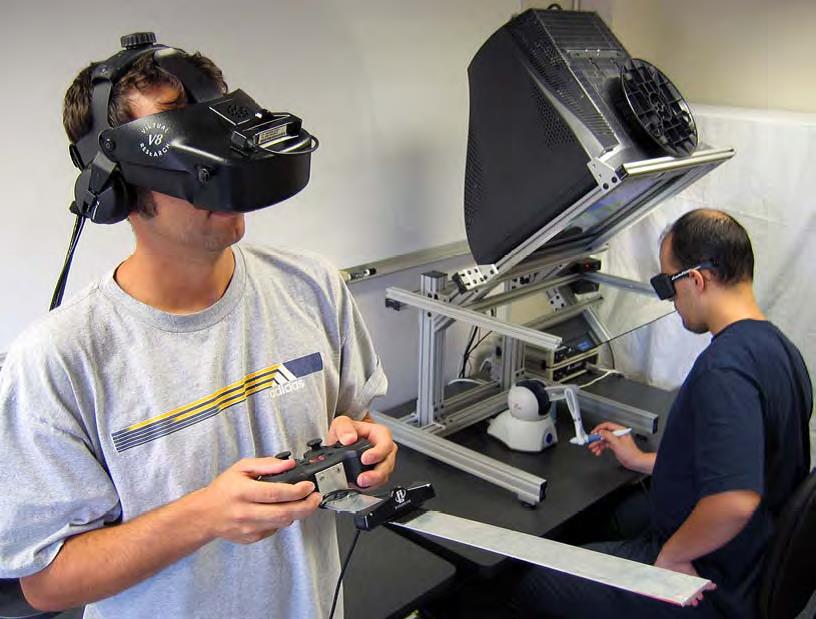
Students using each display type (giving a different views of the virtual tennis application). The egocentric head-mounted display (left) allowed more accurate aiming, and the exocentric fishtank display (right) provided better timing cues. The picture was taken in 2004 and later appeared in Interpretation (2015) vol. 3 issue 3.
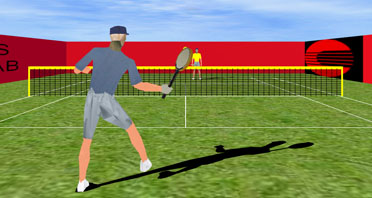
An egocentric view inside the virtual tennis game.
Publications
- IEEE DS-RT 2005 paper showing an early example and evaluation of asymmetrical, networked user interfaces. (DOI)
- Interpretation journal article showing the application of networked VR collaboration to geological visualization. (DOI)
Networked Touch with 2D Tactile Grids (2003+)
We developed a 2D tactile (haptic) grid and control methods for remote networked touch. At the Eurohaptics 2004, IEEE 2004 Haptics Symposium, and IEEE VR 2009 conferences, we demonstrated a setup allowing one user to drag their finger on a touch surface (laptop touchpad) and another user to feel the movement through vibration patterns on our tactile array. Our work on 2D tactile rendering and control functions provides our Networked Touch work with the ability to render moving paths relatively smoothly, with consistent intensities and positions.
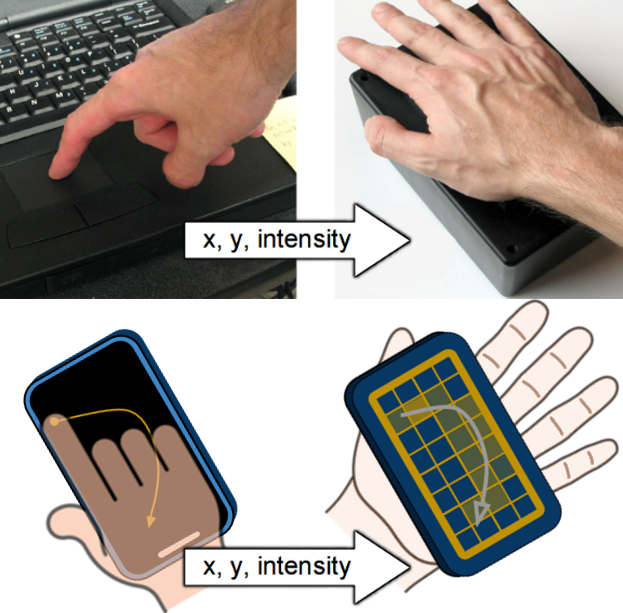
The illustration above shows (on top) the 2004 demo using a laptop touchpad and 2D tactile array to communicate touch and (on bottom) conceptual application to smartphones with palm-facing arrays, allowing one person to “draw” on a remote person’s hand.
Publications
- Christoph W. Borst and Alp V. Asutay, “Bi-level and Anti-aliased Rendering Methods for a Low-Resolution 2D Vibrotactile Array”, IEEE WorldHaptics 2005 conference, pp. 329-335. (PDF)
- Christoph W. Borst and Charles D. Cavanaugh, “Touchpad-Driven Haptic Communication using a Palm-Sized Vibrotactile Array with an Open-Hardware Controller Design,” EuroHaptics 2004 conference.
- Technical report: Christoph W. Borst and Charles D. Cavanaugh, “Haptic Controller Design and Palm-Sized Vibrotactile Array,” technical report. (PDF)
Teleoperation and Security of Surgical Robots (2023 +)
Researchers: Istiak Jaman and Jason Woodworth
Our research is improving the usability and safety of surgical robots. The precision and dexterity enabled by such robots has led to many patient benefits and an uptick of interest in robotic surgery. However, as a relatively new technology, there are still many questions regarding best practices surrounding safety, security, and usability. For example: What is the best way to visualize the operation site to the surgeon while providing optimal comfort and site visibility? How can we render haptic feedback to the surgeon to make them more aware of tissue forces without adding harmful hand jitter? What additional channels does robotic teleoperation leave open for security threats?
We are addressing these and other pressing questions in the field of medical robotics with our surgical robotics test bed. The test bed consists of a Raven II surgical robot, a haptic user interface for surgeon operation, and software for collecting rich data (vision, haptics, IMU, force, etc…). The Raven device is typically used to research, for example, autonomous surgical movement, novel visualization interfaces, or novel sensor architecture meant to be later translated to practical in-use surgical robots such as the Da Vinci. At present, a local user of the surgeon interface can control the Raven’s arms and grippers with multiple input options, including two 6- or 7-DOF haptic stylus input devices, to complete basic surgical-style tasks such as suturing practice, needle transfer, or post and sleeve.
Application: Surgical Robotics Test Bed
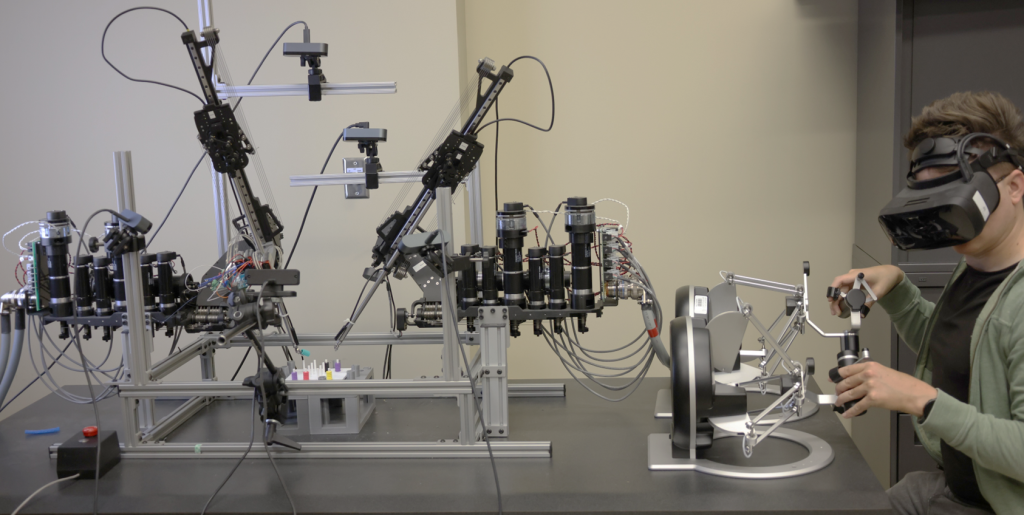
The Raven II robot performing a basic object transfer task.
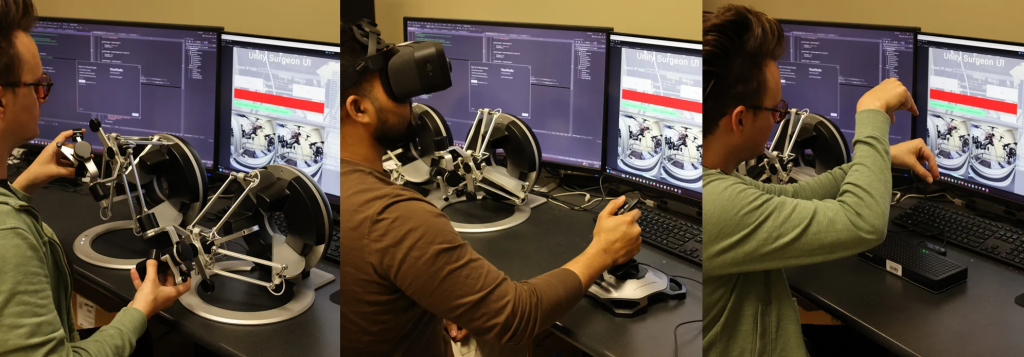
Users of various input types. Joystick motion moves the arms on the horizontal plane, the directional pad on top controls vertical movement, and twisting controls z-axis rotation. Hand tracking has the graspers mirror hand pose and uses pinch gestures to control grippers.